This report is copyright (c)1995 Peter Bosscher and Dean Yeazel. No portion of this report may be reproduced, electronically or otherwise, without express written consent of the authors.
Section I: Software Development Environment
Appendix B: Hardware Studied, Product Literature
All company and product names contained in this report are trademarks or registered trademarks of their respective owners.
Background
This is the first required report for the study: 'Using Handheld Data Collectors in Highway Construction for Accounting and Materials Management'. This study is being funded by a grant to the University of Wisconsin-Madison from the Wisconsin Department of Transportation. The recommendations in this report are based on product literature, and discussions with vendor representatives and other people that work in the pen-based computer industry.
This study proposes to introduce a new method of data collection that will, when fully implemented, eliminate the need for the checking of computations and the checking of computer entries on WisDOT construction projects. This will be accomplished with the use of handheld pen-based data collectors. Field pay quantity measurements and inspector's diary entries will be made on a pen-based data collector. At the end of each day, all entries are uploaded to the PC based systems that are currently in use. Since all entries are made directly into the data collector and nothing will be rekeyed, there will be no need for the checking of entries.
There will be very little invested into the hardware used for the field testing under this project, so the hardware recommendations of this report should not be viewed as final. If the DOT decides to implement this system, any piece of hardware could be used. It is hoped that the discussions contained in this and the final report will provide the user with a working knowledge of what features and issues are involved in selecting a hardware platform. Furthermore, since the hardware market is constantly changing, there may be better alternatives available by the time the study is finished.
On the other hand, there will be considerable effort put into developing the software system. Because of this, the selection of the software development environment is a very sensitive and critical decision.
Software Selection
The market for pen-based software development environments is very small. PenRight! Pro is currently the leading pen-centric development environment on the market. Any non-pen-based development tool requires Windows for Pen Computing to be used on a pen-based computer. Lack of flexibility and lack of pen-centric features in Windows for Pen Computing makes any non-pen-centric development tools unfeasible.
PenRight! Pro has the largest installed user base of any pen system, and is supported by a variety of hardware platforms. It is currently being used by the Michigan Department of Transportation to develop their Bridge Inspection and Construction Management software. The only drawback to this system is the necessity for a Runtime API. However, its flexibility and special pen features outweigh this problem.
Add-on handwriting recognition packages are also available. These are used in conjunction with existing systems, such as PenRight! Pro or Windows for Pen Computing to increase the speed and accuracy of the handwriting recognition that is inherent in the system. One such package is Palm Computing's Graffiti. This add-on will be tested in conjunction with PenRight! Pro.
Hardware Selection
There is a wide variety of pen-based hardware available. Hardware has been selected on a two-tiered basis, based on required functionality. The use required by the field inspector will be limited to recording field measurements and making diary entries. For the typical field inspector, a Personal Digital Assistant will provide enough functionality to replace all paper records, if the final software is written properly. For the Project Manager or Survey Crew Chief, a unit that is capable of running applications such as CAiCE or even the Item Record Account may be more desirable. To provide enough power to run CAiCE and other software, a '486DX or better PC is required.
Since we will be using the selected hardware on construction sites, we must keep in mind how environmentally rugged the selected units are. There are extremely rugged units available, but at a price premium. There are also add-on environmental cases for many of the other units. However, past DOT experience with the Hewlett-Packard HP95LX's has shown that this may not even be necessary. There have been no reported instances of failure in two years of field usage of the HP95's.
From a price, weight and battery-life standpoint, the Casio Z-7000 is the best choice in a Personal Digital Assistant. It weighs about one pound, and it's batteries (standard AA's) will last up to 100 hours under normal usage. A fully outfitted Z-7000 will cost about $1,000. In terms of ruggedness, Casio has environmental cases for their units. We will field test several Z-7000's (both with and without environmental cases) to verify that they will provide the functionality needed. Each inspector on each test project will have one of these units.
At this time, there are three '486DX or better PC units available: Toshiba's T200CS, the TelePad3 from TelePad Corporation, and Fujitsu's Stylistic 500. Since the main reason for choosing a '486DX is to run CAiCE, we have ranked these units in order of most to least powerful: the TelePad3, the Fujitsu's Stylistic 500, and the Toshiba T200CS. Each project manager will have one of these units for field testing.
Software Selection Criteria
The project proposal also listed criteria for selecting the software development environment:
In addition, we will also try to select an environment that produces applications that will run in MS-DOS or Windows, as well as PDA operating systems. This will allow development of one application that can be used both on the new pen-based computers, and on existing desktop PC's.
Hardware Selection Criteria
The project proposal gave the following criteria for selecting the hardware platform:
After review of the software and hardware markets, one of these requirements will be eased: MS-DOS compatibility. There are hardware platforms that are not 100% MS-DOS compatible, but can still run some MS-DOS applications. This is dependent upon the software development environment used.
We will also evaluate hardware for field use of the Wisconsin Department of Transportation's newly adopted Civil Engineering software, CAiCE.
Introduction
Handwriting recognition is generally not an inherent feature of an individual piece of hardware. Instead, it is made available through software applications. A pen-based application can provide two levels of pen support: it can be pen-aware, or pen-centric. In a pen-aware application, the pen is simply used as a mouse. Conversely, in a pen-centric application, the programming interface is built around the pen. As such, there are special functions you can perform using the pen, such as handwriting recognition. In addition, there are often features that can increase the accuracy of the handwriting recognition.
Very few development environments are actually pen-centric. Instead, most provide pen-awareness through either PenDOS or Windows for Pen Computing. These operating systems provide rudimentary pen-features. In addition to the pen being treated as a mouse, a user-transparent overlay is applied, so that any handwriting can be recognized and inserted at the current cursor location. These operating systems are great for adding pen functionality to programs that are not written to be pen-aware, such as CAiCE, RoadCalc, or even WordPerfect. However, they do not offer specialized text entry features that can increase the accuracy of handwriting recognition. Because of this, the best environment for our purposes will be one that is intrinsically pen-centric.
The most important feature of any pen-based system is how well it recognizes handwriting. There are many ways to increase the accuracy of handwriting recognition. Popup lists are an intuitive way of providing the user with a limited set of predefined options to select from (such as project ID or group code). When a smaller set of options are available, radio buttons or check boxes can be used. In either case, the user does not need to write anything, so there is nothing to recognize and accuracy is high.
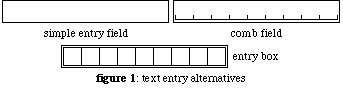
When the user must make a written entry (such as diary text), several alternatives can be provided. A simple entry field can be used, but recognition accuracy is very low because the software does not know where one written letter ends, and the next begins. This is the extent of the recognition for PenDOS or Windows for Pen Computing. If discrete locations are provided for the user to write each letter, the handwriting recognition software will know what gestures belong to which characters. Providing a comb field increases accuracy, while still being an intuitive, non-intrusive method. For further accuracy, entry boxes can be provided. Figure 1 shows samples of the three text entry alternatives. If all else fails, the final alternative is a popup keyboard. This option provides almost the same accuracy as typing on a keyboard, but is only suitable for small pieces of text.
There are three types of development environments available: dedicated programming languages, dedicated database applications, and combination packages.
Dedicated Programming Languages
Examples of dedicated programming languages are C, FORTRAN and BASIC. The biggest advantage of a dedicated language is its flexibility in handling data and creating a user interface. Another advantage is the small disk space required for the compiled application. However, developing an application in this type of environment would mean building it from the ground up. Several hundred lines of code may be needed for even a simple application. Developing an application to the complexity that we are looking for would take a few thousand lines of code. Debugging this size of an application would take many weeks, or even months, thereby greatly lengthening the development process.
The only dedicated programming language available for Windows or DOS that is pen-centric is Microsoft's Visual BASIC. Since we are looking for C or C++ code, this package does not fall within our constraints. Another package of tools is available for GeoWorks, a user interface similar to Microsoft Windows. This requires that the data collector be running GeoWorks. This is not an attractive alternative, since the Wisconsin DOT would need to add yet another operating system. Finally, there are development tools for the Apple Newton, a Personal Digital Assistant (see discussion of Personal Digital Assistants in Section II) that is not DOS or Windows compatible. These are used to write programs specifically for the Newton.
There are many other programming environments, but again, none offer pen-centricity or even pen-awareness. To provide any pen functionality, PenDOS or Windows for Pen Computing would be required. As stated earlier, neither of these options provide the functionality required. Furthermore, running Windows for Pen Computing would greatly increase the amount of storage space required, which more than offsets the small size of the compiled application. Disk space is not necessarily an overriding concern for field data collectors, but it should be kept in mind.
Database Languages
AREV, Paradox and FoxPro are examples of database languages. These systems are centered around handling data. As such, they provide interfaces to simplify creating data structures, data entry screens and reports. Application development time in a database language is probably the fastest of any of the three types of development environments.
One pen-centric product in this market is Power Pen Pal. Pen Pal is a product that automates and simplifies the form building process in PenRight! Pro (see below). No programming is required, but everything is automated, so flexibility is limited. Libraries and custom features cannot be added. Furthermore, because it is built on top of PenRight!, it requires both the PenRight! Runtime and Power Pen Pal Runtime.
These systems are not without their drawbacks. Compiled database applications require much more disk space than a compiled C program. This greatly restricts the minimum size of a data collector that could be utilized. Furthermore, Pen Pal is the only database environment on the market that is pen-centric. To utilize any other database language with a pen-based computer, such as FoxPro or AREV, PenDOS or Windows for Pen Computing would be required. This is undesirable, for the reasons listed above.
Combination packages
As the name implies, these types of packages share common features from programming languages and database languages. They do this by providing C or C++ programming libraries that provide pen-centricity and database handling. Some also provide interfaces similar to those of database languages for building data entry screens and data tables.
One of the oldest combination packages is PenRight! Pro 3.6, a product of PenRight! Corporation. This package provides a graphical interface for creating menus and dialog boxes. Once built, these are linked within the graphical environment, and database structures can be added. From there, PenRight! will generate code for Microsoft or Borland's C compiler. Once compiled, the application is a DOS executable. Since C programming is used, the applications generated are very flexible. Furthermore, since it uses C code, third-party add in libraries can be included.
An additional advantage of PenRight! is that applications can be used on some Personal Digital Assistants (PDA's) that are not 100% MS-DOS compatible. This greatly increases the number of hardware platforms that any application can be used on. A further feature of this environment is the ability to incorporate graphics, and fields for signature capture.
The next version of PenRight! (scheduled for release in February, 1995) will be for Windows. Using this new package, code for Windows can be generated from applications written in version 3.6.
The one disadvantage of PenRight! Pro is that a runtime Application Programmers Interface (API) is required for each machine. A Runtime API is similar to a Windows DLL: it provides a set of function calls for compiled programs to use. Per unit costs for the API are $125, but site licenses are available, and some hardware vendors are bundling it with their products.
See Appendix A for a summary of the specific environments studied.
Add-ons
Add-on handwriting recognition packages are also available. These are used in conjunction with existing systems, such as PenRight! Pro or Windows for Pen Computing to increase the speed and accuracy of the handwriting recognition that is inherent in the system. The drawback is, of course, the disk storage space required and additional cost. One such add-on package is Palm Computing's Graffiti. Grafitti will run within PenRight! Pro and Windows for Pen Computing, and on the Apple Newton. This package will be tested in the field to see if the benefits outweigh the costs.
Final Selection
As indicated above, PenRight! Pro is currently the leading pen-centric development environment on the market. Lack of flexibility and pen-centric features in Windows for Pen Computing makes any non-pen-centric development tools unfeasible. PenRight! Pro has the largest installed user base of any pen system, and is supported by a variety of hardware platforms. The only drawback to this system is the necessity for a Runtime API. However, the flexibility and special pen features of PenRight! outweigh this problem. The Graffiti handwriting recognition add-on will be tested in conjunction with PenRight! Pro.
Introduction
The pen-based computer industry started small, with companies building PC compatibles from scratch. These firms were somewhat ahead of their time, and their products have still not gained widespread consumer acceptance. They have, however, been gaining in popularity in vertical markets. Their biggest users are now insurance claims adjusters, utility companies, and field sales personnel.
Although the market is still relatively small, it has provided enough incentive for vendors to expand their product lines. What started out as a monochrome PC-XT compatible only market has now widened into color '386 and '496 PC Compatibles, and downsized into lightweight, pocket-sized Personal Digital Assistants (PDAs).
Some units are built into environmental cases, while others have add-on cases available. In either case, additional cost is involved for a more rugged unit. It will take actual field testing to determine which is the better alternative. For smaller units (such as a PDA), it may be practical to not use any environmental case. Past experience with HP-95 palmtop PCs has shown that environmental protection may not be necesary for smaller units that can easily be put into a pocket.
The market is even further distinguished by how the display recognizes pen input. Some units use a magnetic field, which provides the most accuracy (this would be ideal for any sensitive work, such as on screen CAiCE editing). Others use a resistive film, which is nearly as good. The remainder use a pressure-sensitive display. These have the advantage of not needing a special pen. Any object (even a finger) can be used as a stylus. However, their accuracy is not as good.
One final factor affecting the cost and performance of a field unit is the type of battery. Some Personal Digital Assistants use standard AA batteries, but most pen based computers use special batteries. There are three special types available: Nickel Cadmium (NiCad), Nickel Metal Hydride (NiMH) and Lithium. NiCad batteries have the shortest life, but are also cheapest. Next in lifespan and cost are Nickel Metal Hydride. Lithium batteries are a newer technology, and therefore the least common (and most expensive).
Even though the market is so diverse, we can enumerate some basic features. Small size and weight will reduce the fatigue of the user that has to carry the unit around the job site all day long. Long battery life will give the inspector more freedom from recharging batteries or being plugged into a wall outlet or cigarette-lighter. Ruggedness increases the lifespan of the unit, and low cost decreases the payback time for each individual unit.
PC Compatibles
PC compatible pen-based computers are generally less powerful than desktop computers. Much of this is due to battery and physical size limitations. In terms of the CPU, they range from PC-XT compatibles to 80486DX4's. Some even have color displays. The PC-XT compatibles are limited in that they cannot run Microsoft Windows for Pen Computing (Windows requires a minimum of an 80386 microprocessor). This will have implications in the type of software development environment that can be used. They also generally have less RAM and smaller hard disk storage capacity. However, as with any computer, the lower it falls in the spectrum, the lower the cost will be.
One thing that must be kept in mind when selecting a pen-based PC compatible is the ultimate desired flexibility of the unit. A lower-end unit can be chosen if it is to be used strictly for quantity data collection and diary entries. Higher end units, could be utilized for these tasks, and would have the added capability of running CAiCE, GPS, or GIS applications.
The general advantages of PC Compatibles (over PDA's) are larger storage capacity and higher computing capability. This results in more flexibility of the unit. Conversely, the units are larger and heavier (2.6 to 7.0 pounds). They are also higher priced. In addition, battery lifespans range from only 2.5 to 8 hours.
PC compatibles can be further broken down into laptops and tablets. Tablets are generally designed strictly for field use, so they are lighter weight. This is accomplished by removing the keyboard, diskette drive, and using a physically smaller hard disk. It should be noted that mass storage for these units is generally limited to a 275MB removable hard drive. This is a severe limitation in the type of application and amount of data that can be stored. Larger storage capacity is available, but at a premium cost, and external storage alternatives may need to be considered. Laptops (as the name implies) have 'normal' laptop PC features: larger hard disk drive (up to 540 MB), internal diskette drive, and full-sized communications ports. The tradeoff is the weight: 3 to 4 pounds heavier than a tablet. Addition of these features can also shorten battery life slightly.
A laptop or tablet fully outfitted for running CAiCE could cost upwards of $5,000. This is assuming the following features, at a minimum:
See Appendix B for features of the specific units studied, and for product literature.
Personal Digital Assistants (PDAs)
A Personal Digital Assistant (as the name implies) is generally sold as a digital pocket address book, calendar, and appointment book. Some include software for note taking, expense accounting, etc. Most have custom microprocessor chips, so they require proprietary operating systems, like GeoWorks or Newton OS. As such, they do not run MS-DOS. However, custom applications can be written for the individual operating systems.
PDAs displays are generally not backlit. They must be used with available light, or external lights. This could be a limitation where there are night or early morning construction operations.
The major advantages of PDAs are their low cost ($500 - $1,500), longer battery life (8 - 100 hours) and lighter weight (one to two pounds). They are, however, limited in storage size and memory. The RAM in a PDA is divided into two parts, similar to the HP95. The first is used by the operating system for its own operation and running applications. The remainder is available as disk space to the user. This limits the disk space available. In addition, if the unit were to completely lose power, all data stored in RAM would be lost. For this reason, any PDA that is chosen will require a removable storage card.
Storage cards come in several flavors. The cheapest alternative is the SunDisk card. It is a solid state mass storage device that function like a hard disk, but without magnetic media. Sizes range from 1.8 to 20 MB. No battery is required, and it fits into any PCMCIA type II slot. PCMCIA stands for Personal Computer Memory Card International Association; an industry standard size and type of expansion card. A further advantage of a SunDisk card is that the PenRight! Runtime API can be purchased bundled with one. A second alternative is an SRAM card. It is similar to the SunDisk, except that it is smaller (512 KB to 2 MB), uses a coin battery for power, and more expensive. A card as small as 2 MB should be adequate for the data storage needs of this project.
PDAs are further limited in their expandability. It is most often confined to one serial port, and one or two PCMCIA slots. However, for inspection activities, this should not be a limiting factor.
Writing an application for certain brands of PDAs would mean starting the entire application from scratch just for that particular unit's operating system. This is an unattractive alternative, both from the production and support standpoint. However, there are some PDAs that will run applications developed in PenRight! Pro. Since we have selected PenRight! as the preferred development environment, any PDA that can run it is a good choice: an application can be developed that will run on a desktop PC, laptop or PDA.
See Appendix B for features of the specific units studied, and for product literature.
Which unit is selected is ultimately determined by what capabilities are desired. If the use will be strictly field inspection, there is no need to pay the extra money for a '386, let alone a '486. For the typical field inspector, a Personal Digital Assistant will provide sufficient functionality to replace all paper records, if the final software is written properly.
From a price, weight and battery-life standpoint, the Casio Z-7000 is the best choice in a PDA. It can be found locally for about $400. Adding a SunDisk card, case, AC adapter, and data transfer hardware brings the total cost to about $1,000 each. Casio also has environmental cases for their units. We will field test several of these in the summer of 1995 (both with and without environmental cases) to verify that they will provide the required functionality and durability.
For the Project Manager or Survey Crew chief, a unit that is capable of running applications such as CAiCE or even the Item Record Account may be more desirable. At this time, there are three '486DX or better PC units available: Toshiba's T200CS, the TelePad3 from TelePad Corporation, and Fujitsu's Stylistic 500. Since the main reason for choosing a '486DX is to run CAiCE, we have ranked these units in order of most to least powerful:
„TelePad3: This is a '486DX4 running at 75Mhz, but future models are planned at up to 100MHz. It's color display, removable keyboard, and expansion ports (they can accept larger hard drives and GPS units) make it a very powerful machine. It will begin shipping in January, 1995.
„Fujitsu's Stylistic 500: The lightest of any of the PC compatibles, this '486DX4 75MHz is only limited by its 64 greyscale display and storage capacity. Mass storage is done on a PCMCIA type III hard drive, so it is limited to about 275MB.
„Toshiba T200CS: this unit has the same storage limitations as the Sylistic 500, and its microprocessor is a 486DX2 running at 40MHz.
There is still some question as to the availability of the TelePad3. In the event of any problems with this unit, the Stylistic 500 will be evaluated with external storage options.
|
Name |
type |
Windows |
stand-alone applications |
runtime cost |
pen aware |
pen-centric |
|---|---|---|---|---|---|---|
|
PadBase |
combination |
optional? |
1 |
|
Yes |
Yes |
|
|
Based on dBase programming language. Creates forms based applications in Clipper 5.0 source code. This product is no longer available | |||||
|
PenRight! Pro |
combination |
optional |
1 |
$145 |
Yes |
Yes |
|
|
For experienced C programmers. Software development kit for building forms-based applications that accept pen-based input. Contains more than 230 routines, including dBase support, and communications routines. | |||||
|
FoxPro |
database |
optional |
Yes |
$0 |
3 |
|
|
|
| |||||
|
Power Pen Pal |
database |
optional? |
1, 2 |
|
Yes |
Yes |
|
|
Pen application development environment for PenRight! Pro. No knowledge of C or PenRight! Pro is required. | |||||
|
Visual Basic |
language |
req'd |
Yes |
$0 |
Yes |
|
|
|
'Official' Microsoft Windows development package. Includes pen-centric plugins. | |||||
|
Visual C++ |
language |
req'd |
Yes |
$0 |
3 |
|
|
|
Non-pen-centric Microsoft development environment. | |||||
|
Notes | ||||||
|
1 |
compiles, but requires PenRight! runtime API | |||||
|
2 |
compiles, but requires Power Pen Pal Runtime | |||||
|
3 |
not built-in, but available through MS Windows for Pen Computing | |||||
Hardware is listed alphabetically by type, vendor and model.